Contents
Attack log
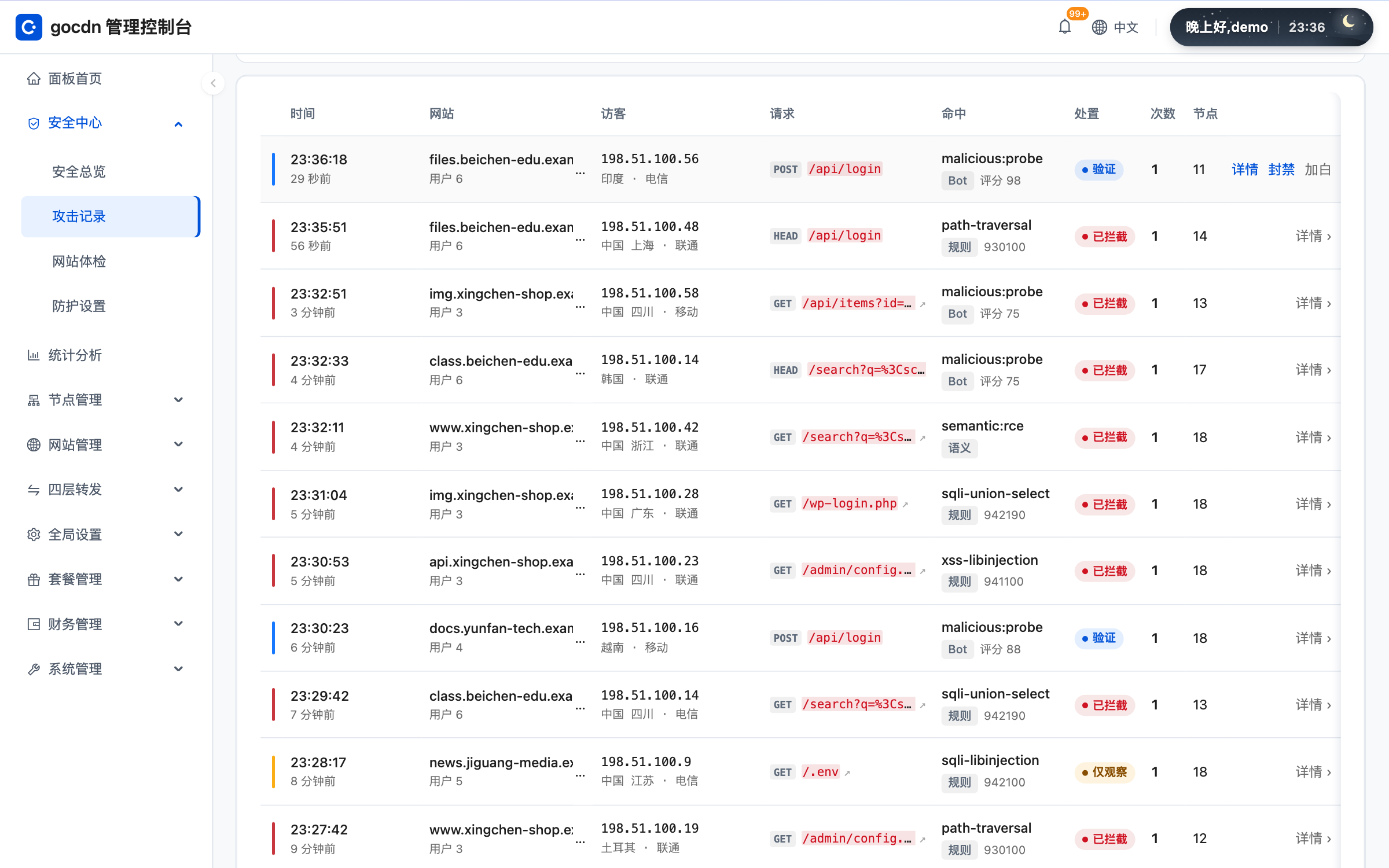
Security Center › Attack Log lists requests that the WAF blocked or challenged, and IPs that were banned automatically or manually. Events are kept for 7 days, and bans unlock automatically when they expire.
Console · Attack Log
How to read it
- Filter by site, time, attack type and action (block, challenge, log only).
- Click an entry for details: the rule that matched, request path, source IP and its location.
- Banned IPs also show up here and can be unbanned manually.
Wrongly blocked?
- In the event details click "Add to allowlist" to put the IP into this site's IP allowlist (all paths and rules).
- If a rule is giving a false positive rather than one IP, add an exception in the WAF settings; see WAF.
Caution Bot, upload scan, tamper protection and leak protection events cannot be allowlisted yet; an event with no owning site cannot be added to a site allowlist either.
Export
You can export by the current filter. Cache purge, prefetch, unlock and log download have daily limits.
For overall trends from a statistics view, see Statistics.